RouteWise MVP

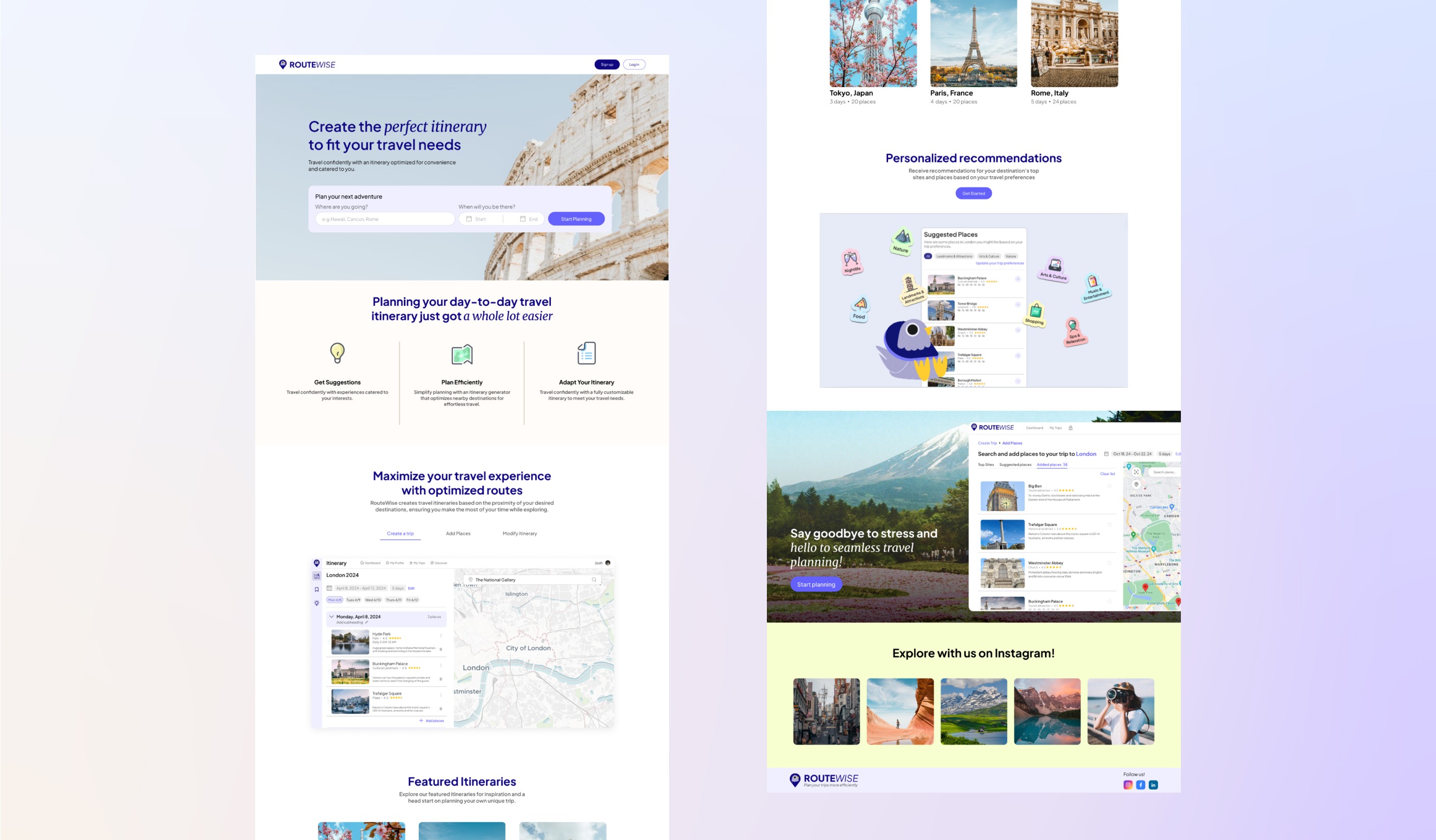
I worked with a small, cross-functional product team to create an MVP of a travel itinerary planner, initiated through the Co.Lab Product Bootcamp. RouteWise helps you easily create travel itineraries that optimize the proximity of the places you want to visit for efficiently-planned days on your next adventure.

Fall 2023 - Spring 2024

The image featured in the middle of the about us page

Helping travelers plan smarter, not harder

Overview

In Fall 2023, I joined forces with a product manager and two developers through the Co.Lab product bootcamp. Our challenge? Design, build, and ship an MVP in under two months.

That MVP became RouteWise, a travel itinerary generator that helps users create smart, proximity-based travel plans with ease.

But what started as a bootcamp project didn’t stop there. What began in a 8-week sprint evolved into something more: a continued collaboration, a product we believed in, and the seed of a startup.

Role

Product Designer

Collaborators

1 Product Manager
2 Developers

Problem

Planning a trip sounds fun…until you get into the weeds.
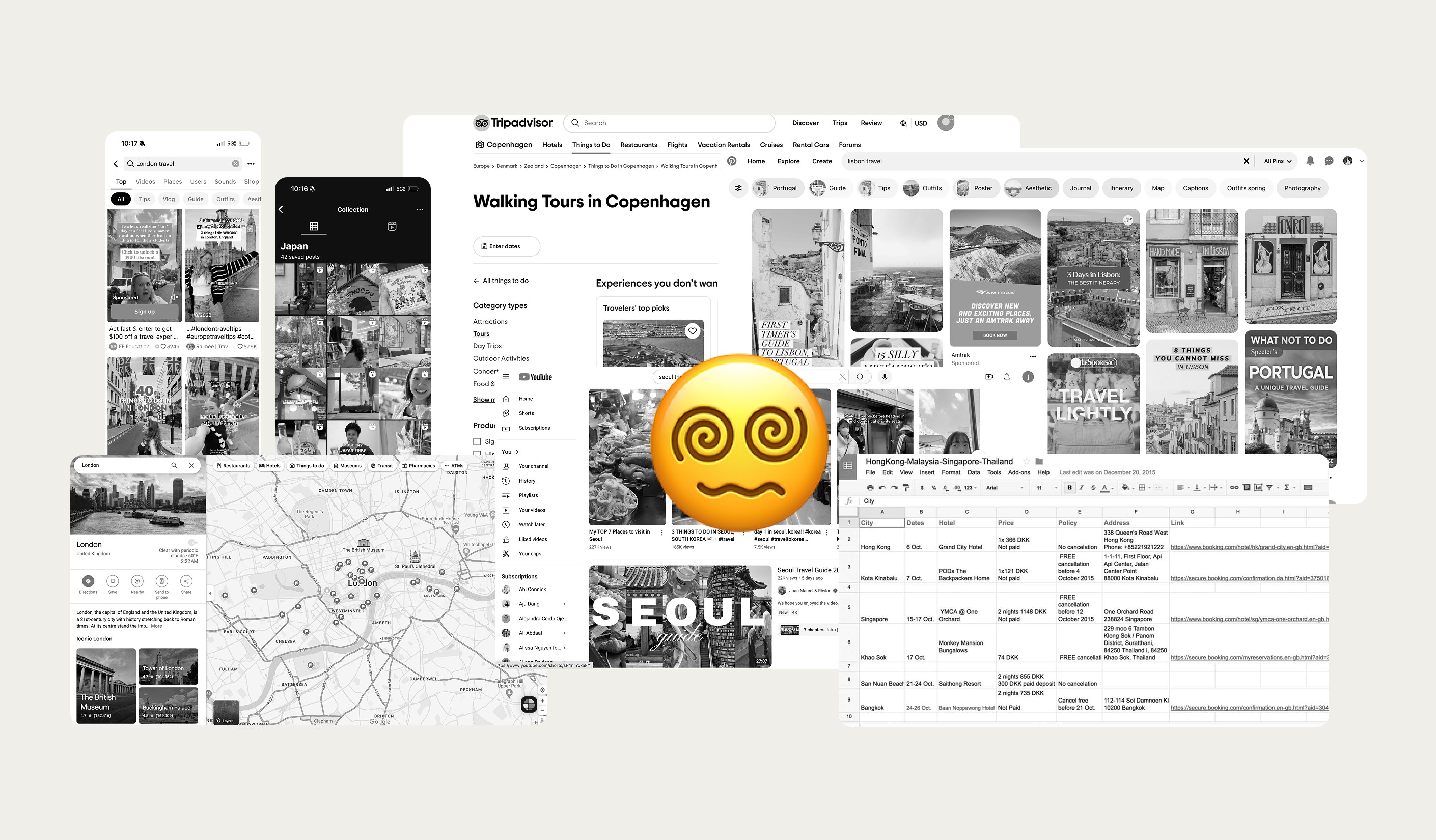
Flight have been booked, and PTO has been requested. You’re bouncing between Google Maps, TikTok, Pinterest, and messy docs trying to fit everything into a logical daily plan. It’s time-consuming, overwhelming, and easy to overlook that one can’t-miss spot.

Travelers needed a smarter way to organize their days — one that saves time, reduces stress, and makes sure they don’t miss out.

Flight have been booked, and PTO has been requested. You’re bouncing between Google Maps, TikTok, Pinterest, and messy docs trying to fit everything into a logical daily plan. It’s time-consuming, overwhelming, and easy to overlook that one can’t-miss spot.

Travelers needed a smarter way to organize their days — one that saves time, reduces stress, and makes sure they don’t miss out.

Flight have been booked, and PTO has been requested. You’re bouncing between Google Maps, TikTok, Pinterest, and messy docs trying to fit everything into a logical daily plan. It’s time-consuming, overwhelming, and easy to overlook that one can’t-miss spot.

Travelers needed a smarter way to organize their days — one that saves time, reduces stress, and makes sure they don’t miss out.

The image featured in the middle of the about us page

Solution

RouteWise generates a location-optimized itinerary based on where travelers want to go.
RouteWise groups nearby points of interest to maximize time and minimize chaos. Travelers can explore curated recommendations based on their interests, add top-rated places with one click, and edit their plan however they like, all in one place.

RouteWise groups nearby points of interest to maximize time and minimize chaos. Travelers can explore curated recommendations based on their interests, add top-rated places with one click, and edit their plan however they like, all in one place.

RouteWise groups nearby points of interest to maximize time and minimize chaos. Travelers can explore curated recommendations based on their interests, add top-rated places with one click, and edit their plan however they like, all in one place.

How it Started

RouteWise began in Phase 1 (Oct–Dec 2023) during the Co.Lab Product Bootcamp. We had less than 8 weeks, 4 members, and one goal: to build a ship a working MVP.

We chose travel because we were all travelers in some capacity or another ourselves which meant we knew the problem well.

After the bootcamp, we asked: “What if we kept going?”
So we did.

Phase 2 (Winter-Spring 2024) has been about iteration, improvement, and implementing design and technical upgrades to ensure a better user experience and prepare RouteWise for a public launch.

Research and Discovery

How might we help travelers plan smarter itineraries faster and without the overwhelm?

To validate our direction, I surveyed nearly 30 travelers and conducted 6 in-depth interviews. The insights were loud and clear:

🕓 62% said trip planning takes too much time
📍 48% feared missing out on key attractions
📑 52% struggled to keep everything organized
🚗 48% wanted help planning an efficient route

Based on the findings, we came up with the following hypothesis:

If we help users generate itineraries based on location proximity, they’ll save time and reduce planning stress while maximizing their travel experiences.

Designing the MVP: Core Flow

Before jumping into pixels, I created a simple user flow to align the team and scope the MVP:

  1. Create a trip

  2. Add a list of places

  3. Generate a proximity-based itinerary

  4. Edit and refine

  1. Create a trip

  1. Create a trip

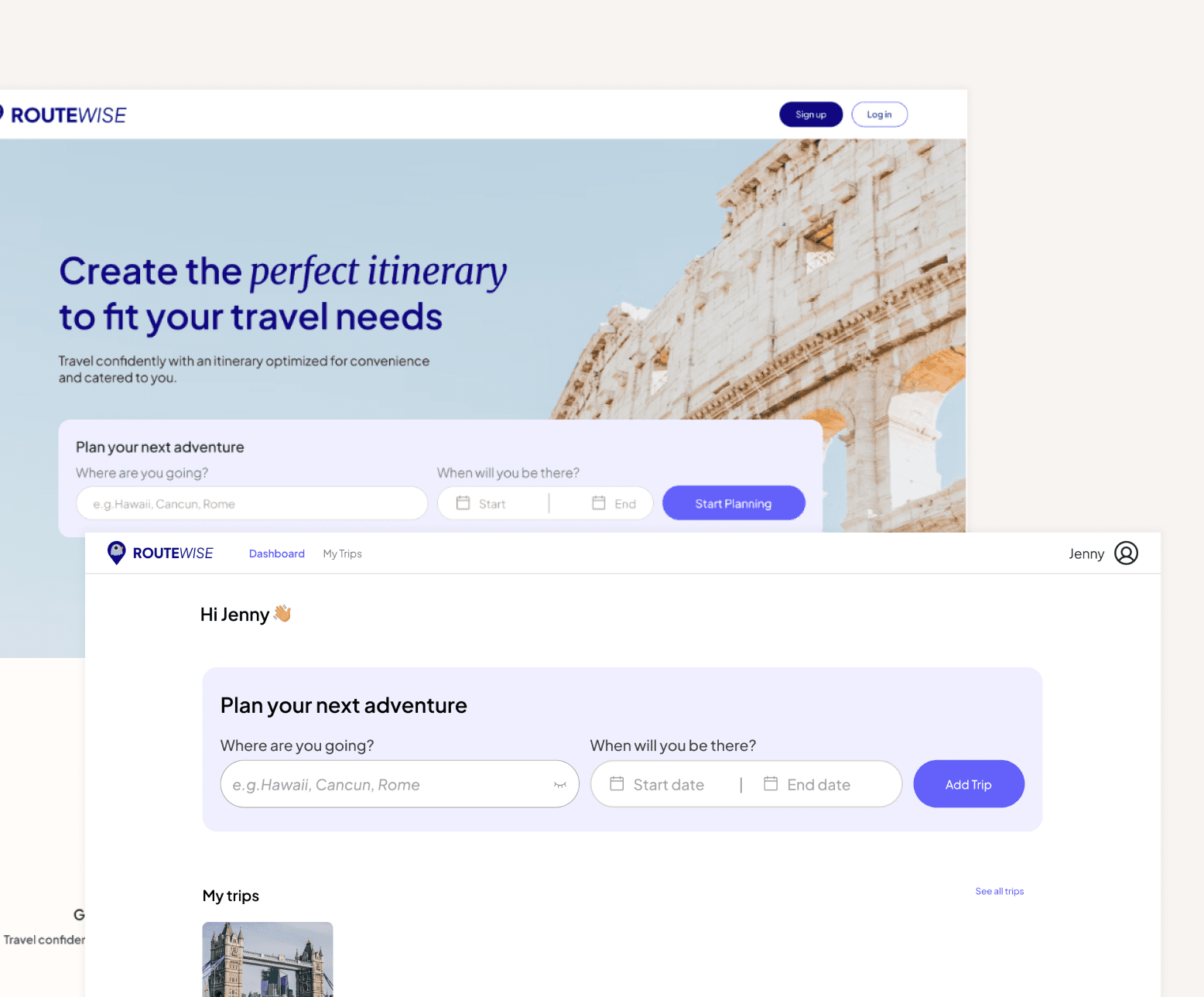
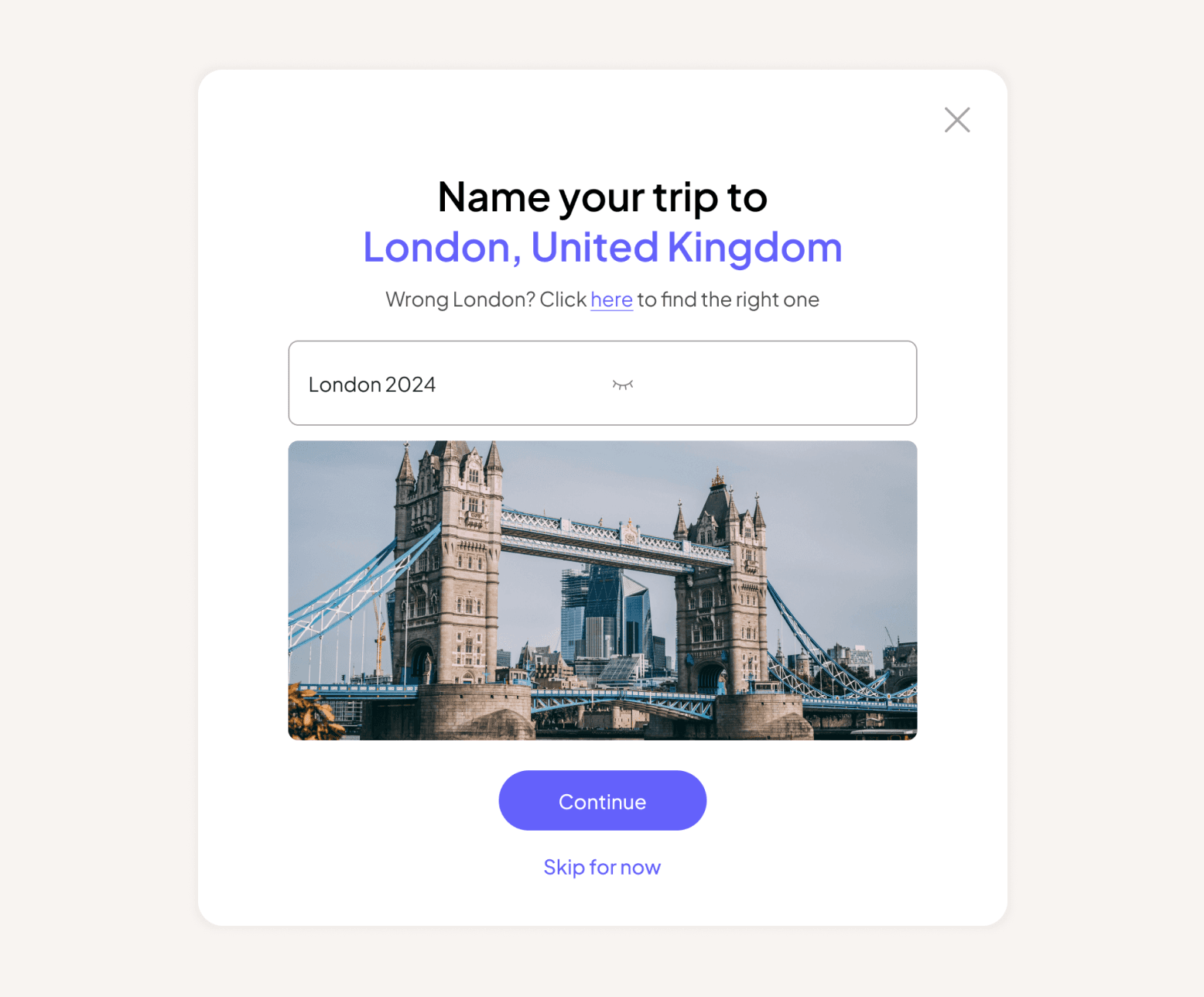
After creating an account, travelers begin by entering trip basics: destination, dates, and a custom name. Personal, simple, and quick.

After creating an account, travelers begin by entering trip basics: destination, dates, and a custom name. Personal, simple, and quick.

After creating an account, travelers begin by entering trip basics: destination, dates, and a custom name. Personal, simple, and quick.

Landing and Dashboard screens to create a trip

Landing and Dashboard screens to create a trip

Pop-up model to name trip

Pop-up model to name trip

  1. Add places you want to visit

  1. Add places you want to visit

User interviews revealed that while some people enjoy spontaneity, most prefer control and clarity.

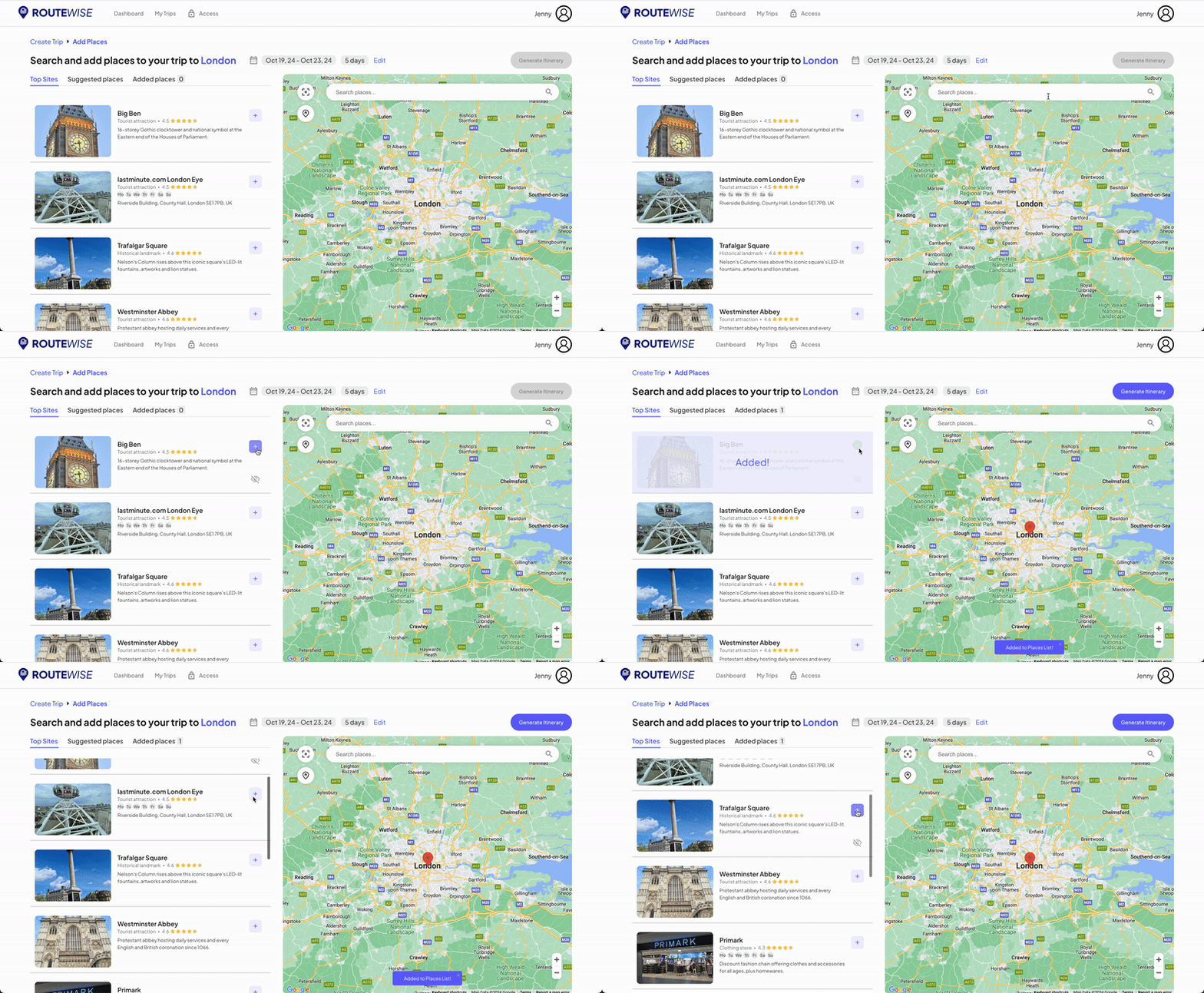
So we designed an intuitive map + list interface to help travelers search and add points of interest (POIs) to their trip.

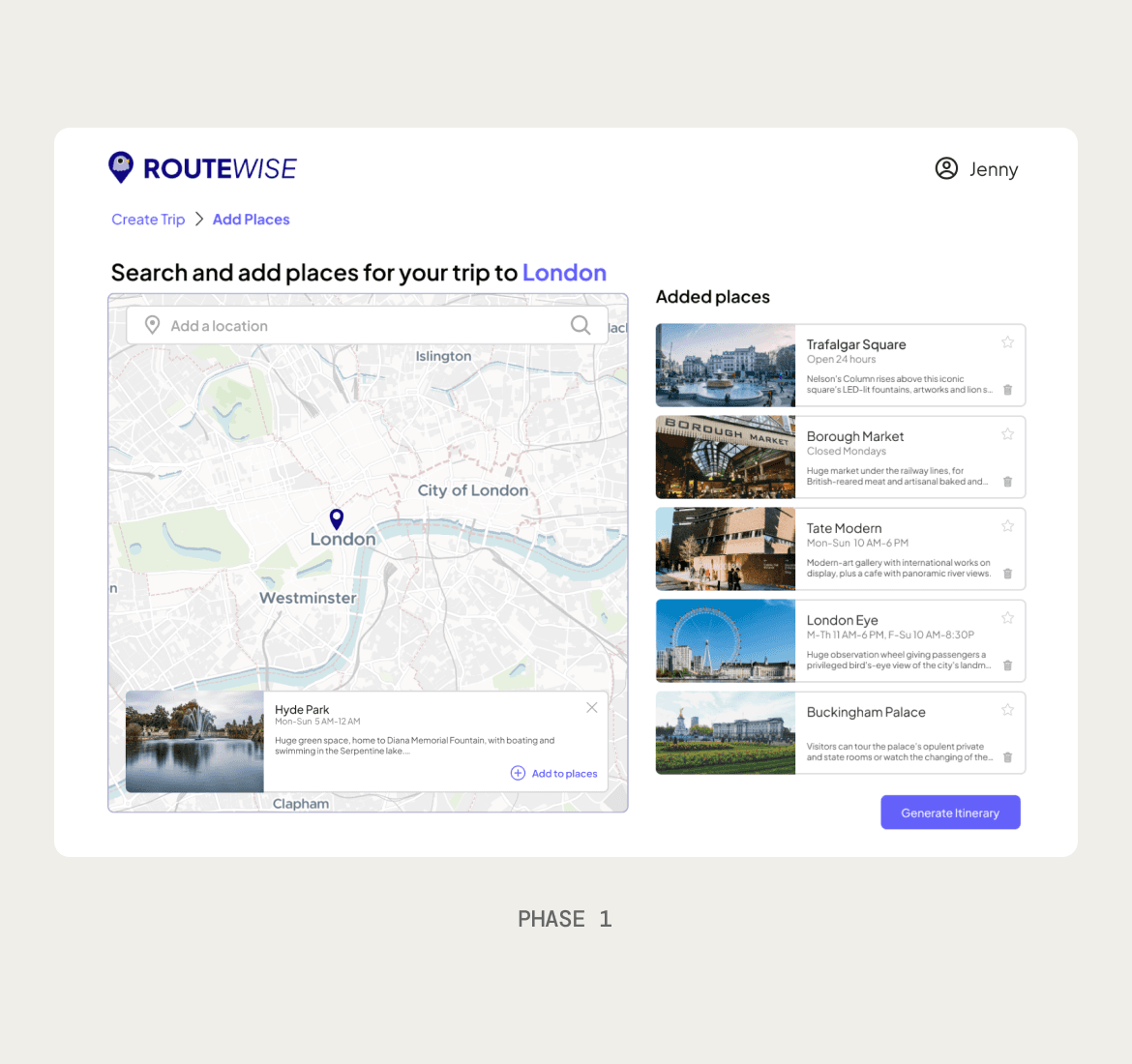
🗺️ Phase 1 Layout:
Map on the left, list on the right. Functional, but not aligned with common patterns.

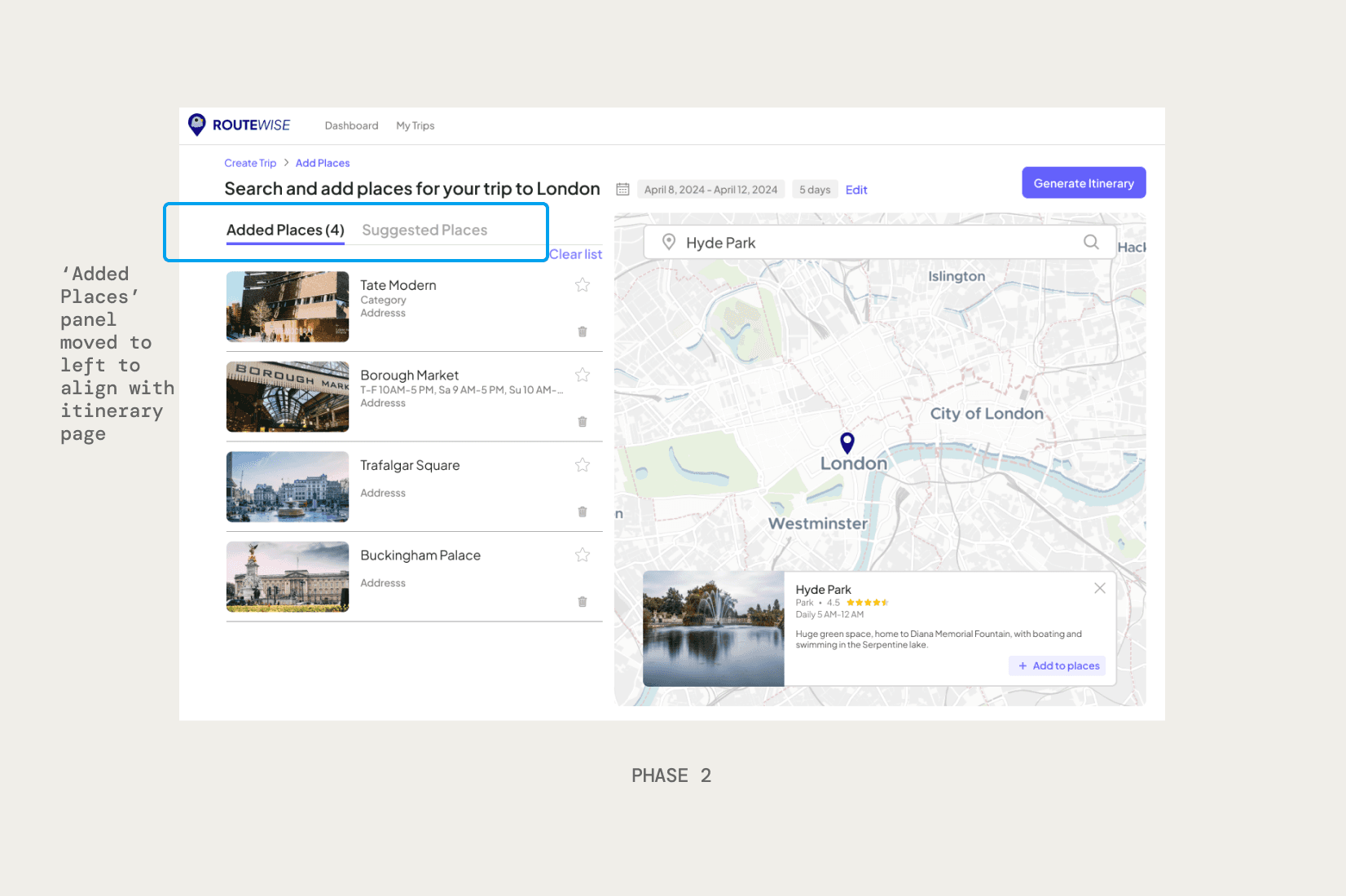
🎯 Phase 2 Iteration:
We reversed the layout for better consistency with mental models and the itinerary screen. A “Suggested Places” feature was added to help users quickly add top-rated spots.

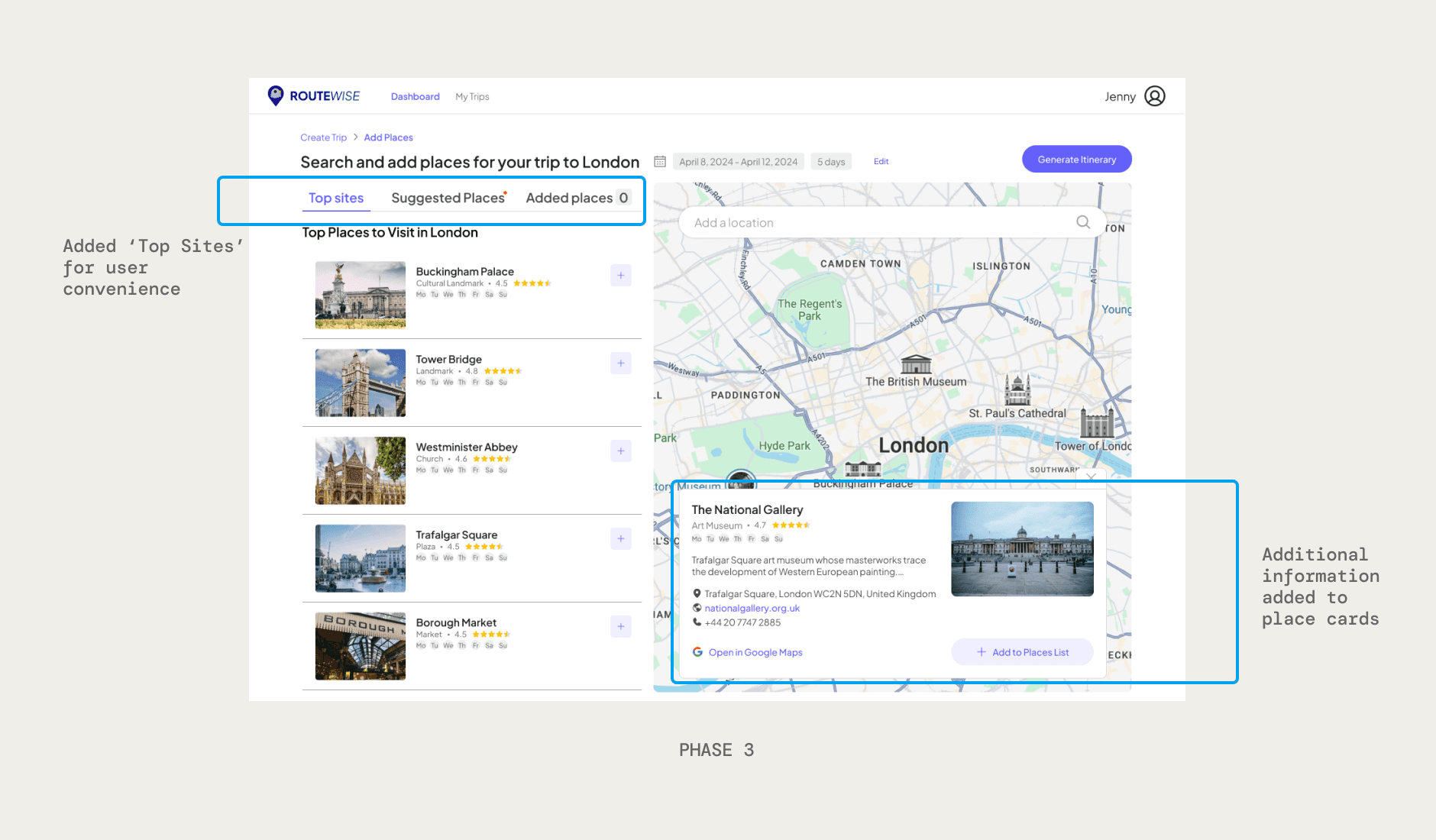
🛠️ By Iteration 3, we integrated MapBox API to provide:

  • Popular site recommendations

  • Key info like hours, star ratings, and more

  • One-click add to itinerary

User interviews revealed that while some people enjoy spontaneity, most prefer control and clarity.

So we designed an intuitive map + list interface to help travelers search and add points of interest (POIs) to their trip.

🗺️ Phase 1 Layout:
Map on the left, list on the right. Functional, but not aligned with common patterns.

🎯 Phase 2 Iteration:
We reversed the layout for better consistency with mental models and the itinerary screen. A “Suggested Places” feature was added to help users quickly add top-rated spots.

🛠️ By Iteration 3, we integrated MapBox API to provide:

  • Popular site recommendations

  • Key info like hours, star ratings, and more

  • One-click add to itinerary

User interviews revealed that while some people enjoy spontaneity, most prefer control and clarity.

So we designed an intuitive map + list interface to help travelers search and add points of interest (POIs) to their trip.

🗺️ Phase 1 Layout:
Map on the left, list on the right. Functional, but not aligned with common patterns.

🎯 Phase 2 Iteration:
We reversed the layout for better consistency with mental models and the itinerary screen. A “Suggested Places” feature was added to help users quickly add top-rated spots.

🛠️ By Iteration 3, we integrated Google API to provide:

  • Popular site recommendations

  • Key info like hours, star ratings, and more

  • One-click add to itinerary

The image featured at the top of the about us page #2
The image featured in the middle of the about us page

3 & 4. Generate and edit your itinerary

3 & 4. Generate and edit your itinerary

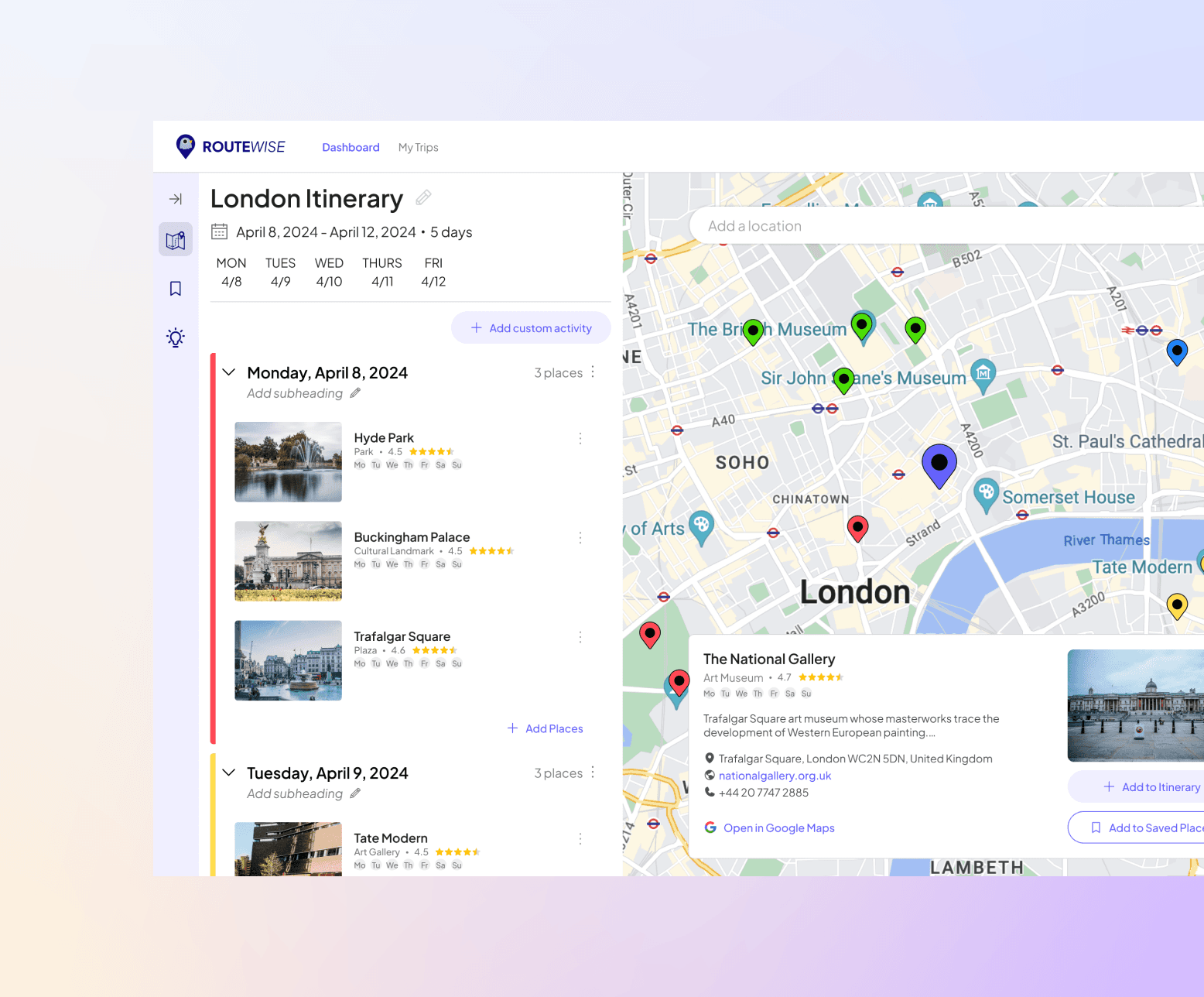
The core of RouteWise is all about giving users a proximity-based itinerary that maximizes time and efficiency while on a trip.

To avoid overwhelming the interface, I focused on two priorities:

  • A sidebar for clean navigation between features

  • A structured, editable itinerary layout with logical grouping

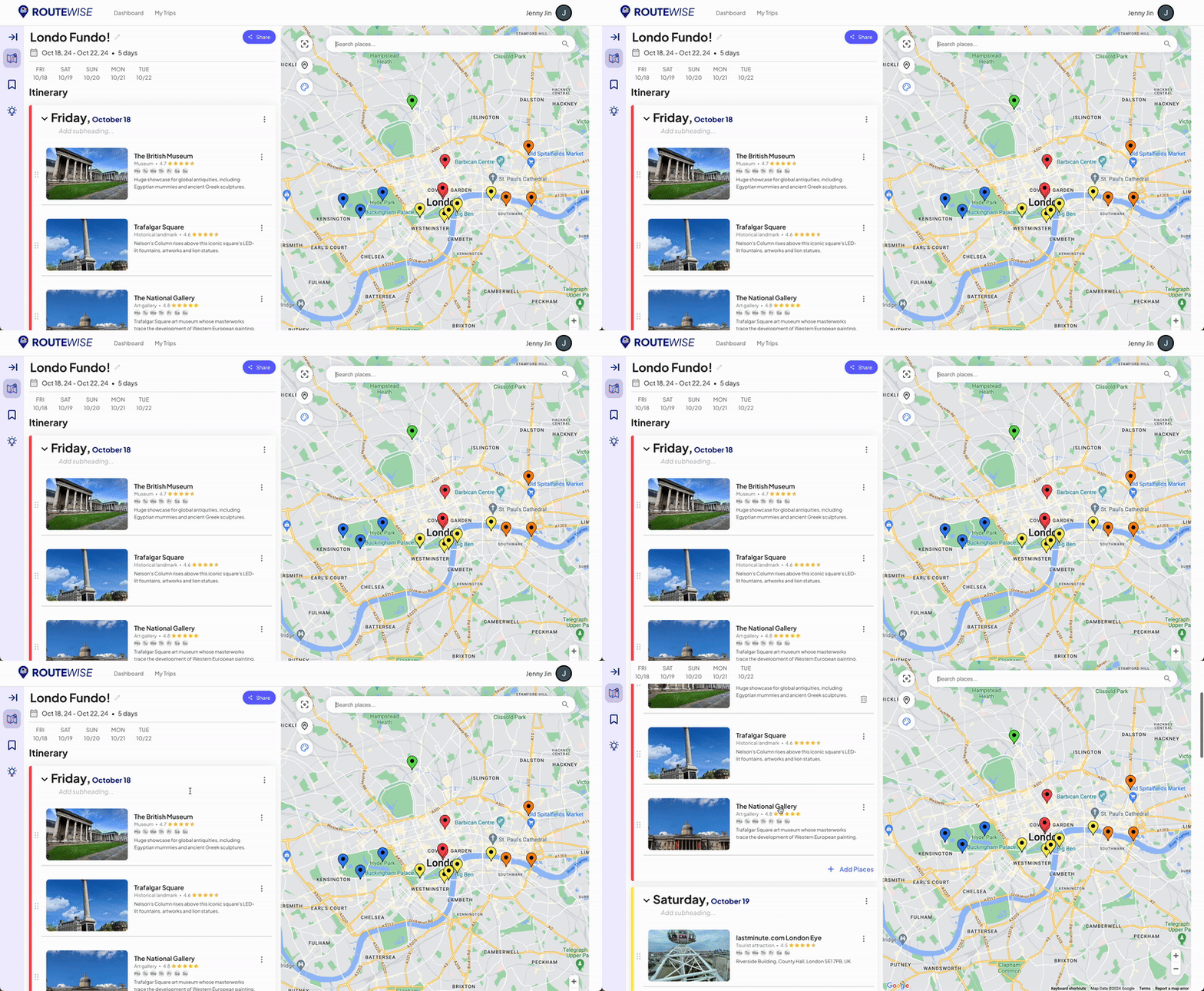
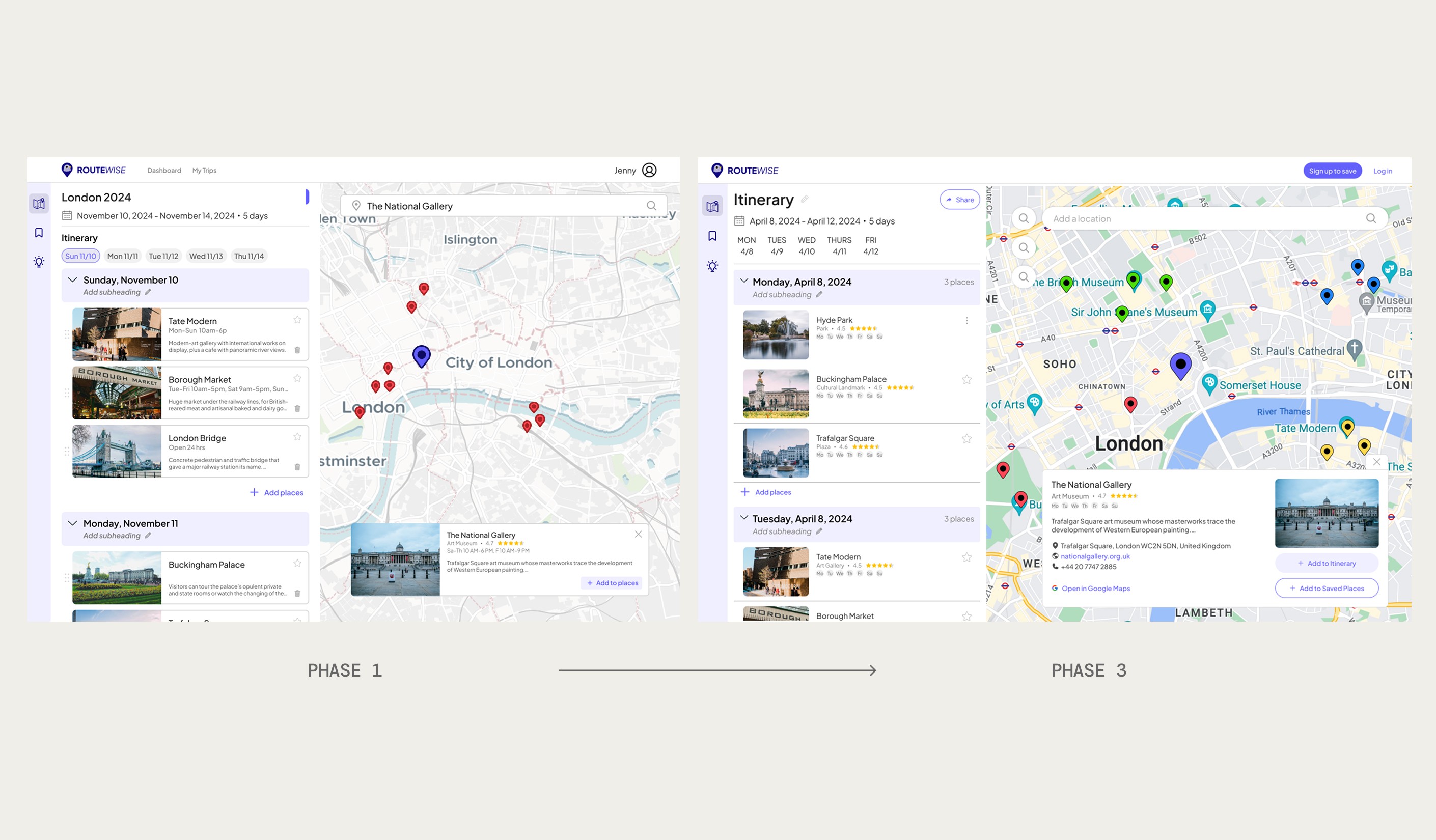
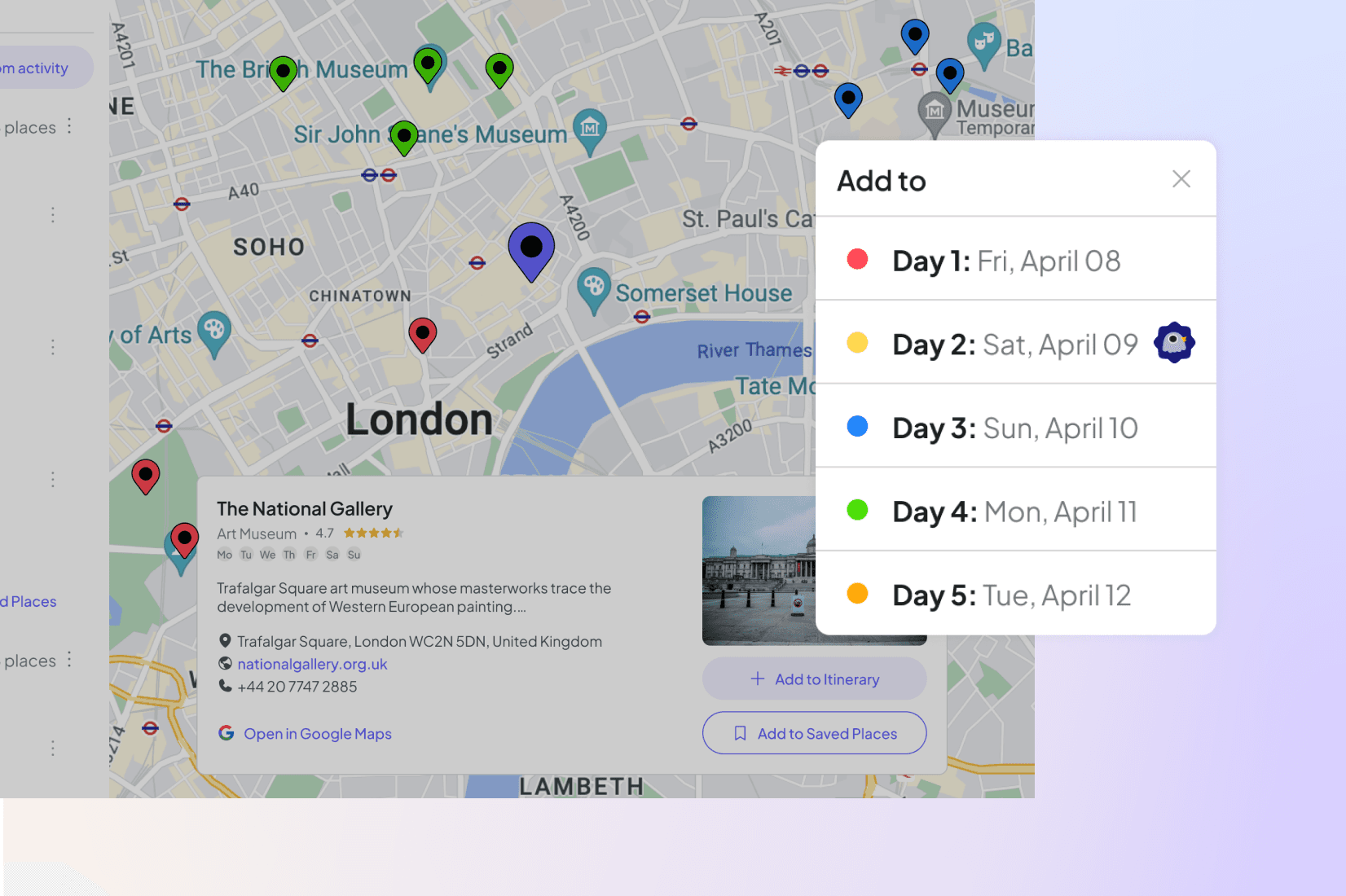
In Phase 3, we implemented color-coded map pins helped distinguish each day’s activities at a glance to help visual planners.

The core of RouteWise is all about giving users a proximity-based itinerary that maximizes time and efficiency while on a trip.

To avoid overwhelming the interface, I focused on two priorities:

  • A sidebar for clean navigation between features

  • A structured, editable itinerary layout with logical grouping

In Phase 3, we implemented color-coded map pins helped distinguish each day’s activities at a glance to help visual planners.

The core of RouteWise is all about giving users a proximity-based itinerary that maximizes time and efficiency while on a trip.

To avoid overwhelming the interface, I focused on two priorities:

  • A sidebar for clean navigation between features

  • A structured, editable itinerary layout with logical grouping

In Phase 3, we implemented color-coded map pins helped distinguish each day’s activities at a glance to help visual planners.

The image featured in the middle of the about us page

Usability Testing and Insights

Clean design, but how do we reduce friction?

I led 3 rounds of usability tests: First with a prototype in Figma (pre-dev), again with our first MVP at the end of Phase 1, and once more at the end of Phase 2. Here’s what we learned:

90% said the interface felt intuitive and easy to use
✅ Users loved the clean design and organization

But there were friction points:

🔍 The search bar lagged when loading place suggestions
🙋‍♀️ 88% mentioned curated recommendations or a way to add places faster
📝 75% asked for more details to help them decide what to add

Key Iterations

Key Iterations

To address user feedback and improve the UX, we made several major updates in Phase 2:

🔁 Upgraded from OpenMap (free) to MapboxAPI

To validate our idea, the development team opted for a free map and search API during Phase 1. After usability testing of our working MVP, we decided to upgrade to Mapbox based on user feedback. This update gave us access to richer data, more flexibility in product features, and a smoother experience for the end user.

🧾 Redesigned Place Cards

Users wanted more context to the places they were adding to their itinerary: What type of place is it? Where is it? What's the rating? What are the reviews?

Before: Just the name and hours
After: Star rating, category, address, website, phone, and Google Maps link

🎨 Color-Coded Itineraries

Pins now align with each day for a visual cue that reduces confusion.

The End of Phase 2

RouteWise now helps travelers:

✅ Explore suggestions based on their interests
✅ Generate a smart itinerary grouped by proximity
✅ Edit freely while staying optimized
✅ Save time and reduce stress all in one clean, modern interface

The image featured at the top of the about us page #2
The image featured in the middle of the about us page

What I Learned

As the sole designer, I had to balance user needs with technical constraints and tight timelines. I stretched beyond UX and UI, creating everything from user flows and wireframes to branding and visual design.

Working cross-functionally taught me how to:

  • Prioritize features that deliver the most value

  • Communicate design trade-offs clearly

  • Collaborate with engineers and PMs toward a shared vision

What's Next

We're only just getting started.

In Q3 of 2025, we’ll be launching RouteWise for beta testing.

I’m excited to:

  • Build a scalable design system

  • Expand the brand identity

  • Get even more user feedback

And of course… help more people travel smarter, not harder. ✈️
More Projects ->

The image featured in the middle of the about us page

I designed the 0-1 MVP of RouteWise, a travel itinerary planning app that helps travelers plan their day to day trip plans more efficiently.

The image featured in the middle of the about us page

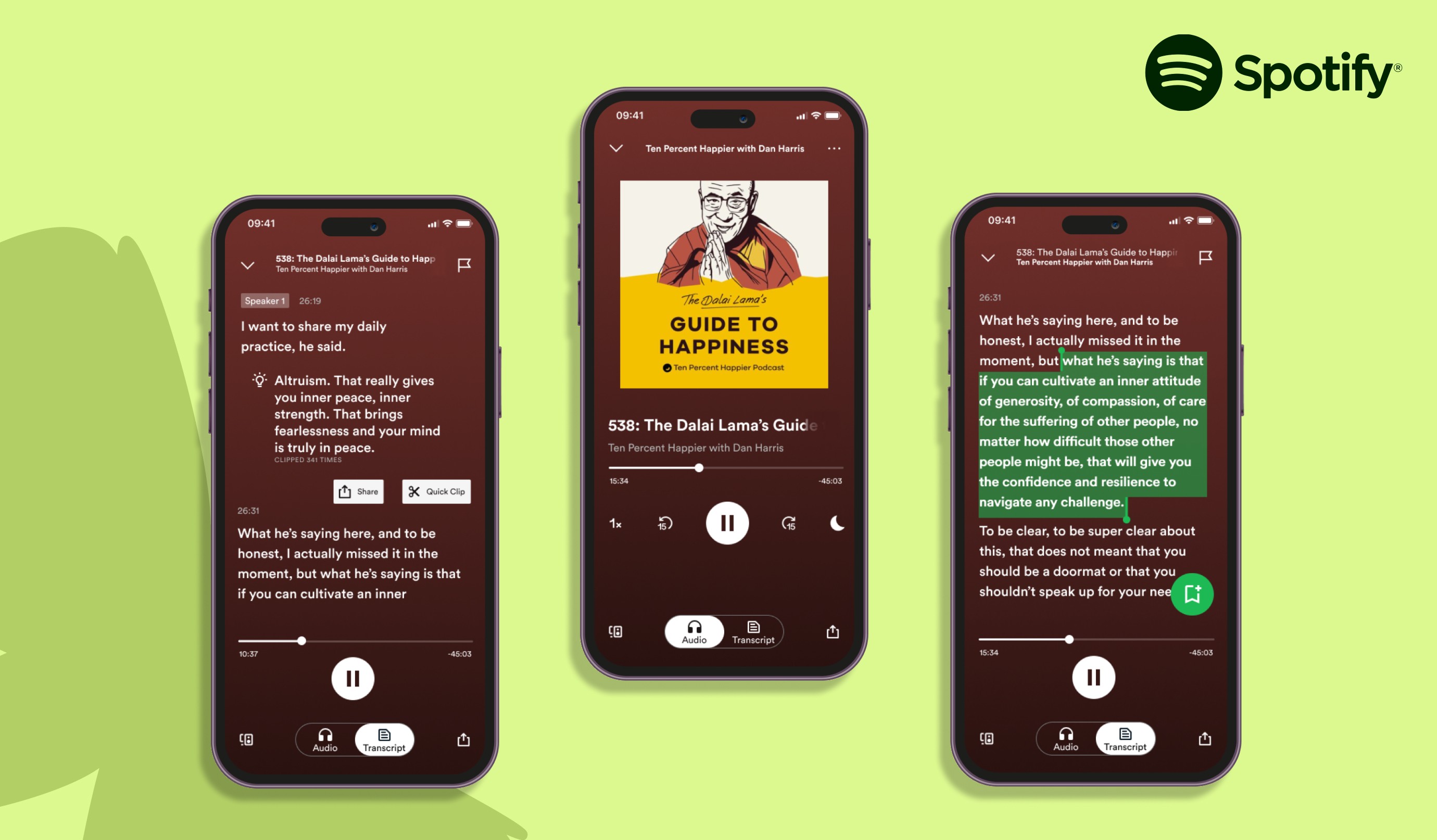
A conceptual feature that helps podcast listeners save meaningful audio moments alongside text transcripts

Let's make something great.

Happy to coffee-chat about anything—design, new projects, work opportunities, travel, education, kdramas, walking the Camino de Santiago (new fav topic!)—virtually, or irl in Washington, DC.

made out of necessity. because, well, i'm a designer. 😉

Let's make something great.

Happy to coffee-chat about anything—design, new projects, work opportunities, travel, education, kdramas, walking the Camino de Santiago (new fav topic!)—virtually, or irl in Washington, DC.

made out of necessity. because, well, i'm a designer. 😉

Let's make something great.

Happy to coffee-chat about anything—design, new projects, work opportunities, travel, education, kdramas, walking the Camino de Santiago (new fav topic!)—virtually, or irl in Washington, DC.

made out of necessity. because, well, i'm a designer. 😉